
Question :
How to add custom domain to Adobe Portofolio
Answer :
Make sure you have a domain first. You can buy a cheap domain here.
Find your Adobe Portofolio IP address.
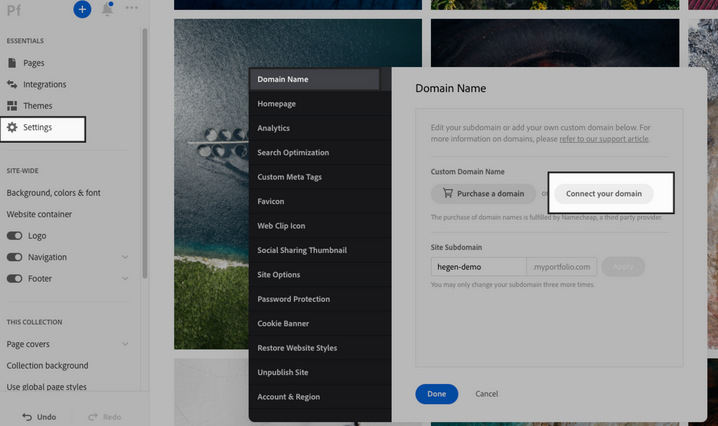
- Go to Settings at the left panel.
- Click Domain name.
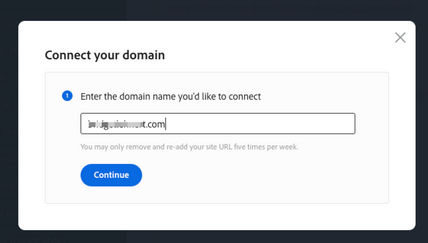
- Click Connect to your domain name.
- Copy IP address (there are 2 different IP address).
Update your domain DNS records.
- Login to your client area.
- Go to My Domains and Manage DNS at top.
- Look for your own domain that wish to be configure.
- Or you can go to our livechat and request DNS to be added.
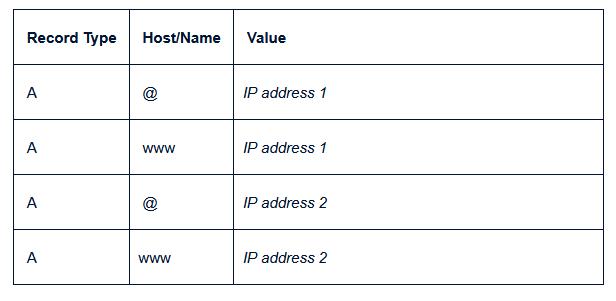
Save your DNS changes.
Now connect Domain in Adobe Portofolio.
- Login to your Adobe Portofolio editor.
- Click Settings > Domain name.
- Input your custom domain name.
- Connect domain.
- Apply.
The DNS may take up to few hours before fully propagated.