
Question :
How to set email routing in cPanel?
Applicable to :
- cPanel Lite / Beginner / Plus / Pro / Max
- VPS Linux SSD / NVME (with cPanel)
- Dedicated Servers (with cPanel)
Answer :
This method is used if you have a website at cPanel and you have email in different server ie. Exabytes Business Email. In this case, you need to tweak configuration in cPanel first.
Please do login to your cPanel hosting or server. Make sure you logged in as cPanel user.
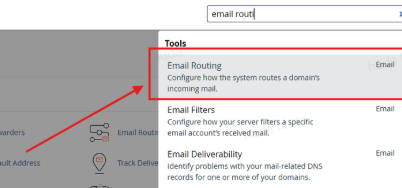
Now from cPanel Dashboard, search for Email Routing.
And then choose for Remote Email Exchanger.
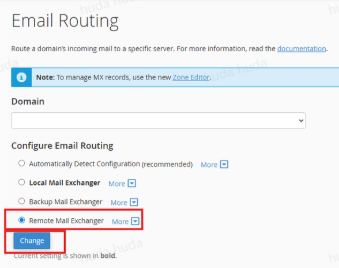
Click Change.
You also need to check your MX records see if the records is correct one. After that do a test send email and see if it is reachable.