
This guide walks you through four practical, complementary protection steps: from the initial Cloudflare setup all the way to access control configuration at the server level.
Why Protecting Your Website with Cloudflare Matters
Cloudflare is a CDN (Content Delivery Network) and comprehensive security solution trusted by millions of websites worldwide. When you activate Cloudflare, all incoming traffic to your website first passes through Cloudflare's network before being forwarded to your hosting server.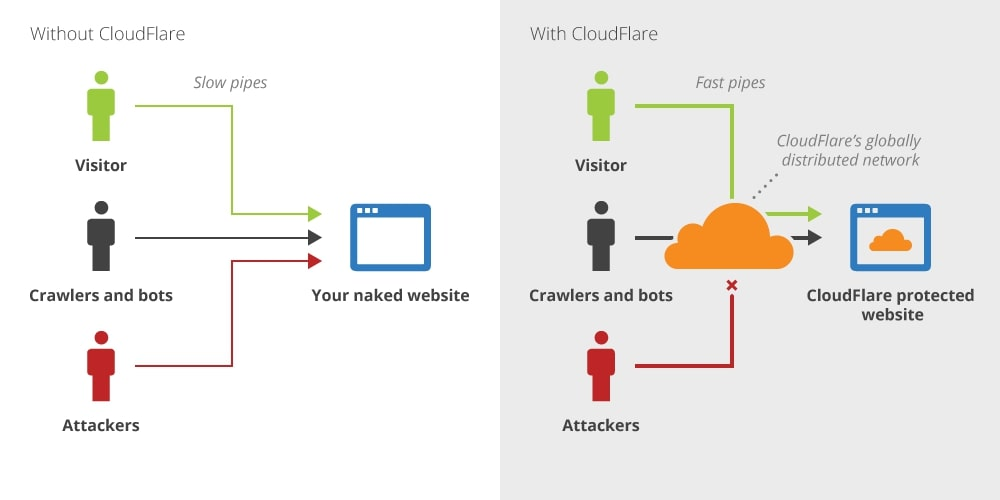
Some of the key benefits you'll notice right away:
1. On the security side: automatic 24/7 DDoS protection, bot and malicious crawler filtering, custom firewall rules, free SSL/TLS, and geographic access control.
2. On the performance side: faster website access through a global CDN network, content caching at edge servers, reduced direct load on your origin server, and significant bandwidth savings.
Guide Contents
Follow all four guides below in order to build comprehensive, layered protection for your website:
1. Set Up Cloudflare on Your Domain
The essential first step: connect your domain to Cloudflare, configure DNS and SSL/TLS settings, and enable Cloudflare's baseline protection.
Protect Your Domain with Cloudflare (New UI)
2. Enable Bot Fight Mode — Stop Bot & Crawler Traffic
If your bandwidth is spiking or your server feels sluggish without a clear reason, bot and crawler traffic is likely the culprit. Enable Cloudflare's Bot Fight Mode to automatically filter it out.
How to Handle Traffic Spikes Caused by Bot / Crawler Traffic
3. Configure Geo-Restriction — Block Access from High-Risk Countries
Limit your website's accessibility to only the countries relevant to your target market. This is an effective way to reduce exposure to threats from outside your intended audience while conserving server resources.
Save Resources and Secure Access with the Geo-Restriction Feature on Cloudflare
4. Imunify360 Anti-Bot Protection (For cPanel VPS + Imunify360 Users Only)
For cPanel VPS users with the Imunify360 add-on, add an extra layer of protection directly at the server level. This feature uses JavaScript Challenges and CAPTCHA to verify whether a visitor is a real human or a bot, blocking illegitimate traffic before it can burden your web application.
Imunify360 Anti-Bot Protection — Activation Guide
Looking for a hands-off solution? Exabytes offers a Managed Cloudflare service that covers full configuration, Advanced WAF Rules, Advanced BOT Protection, and proactive technical support — no manual setup required. Learn more: exabytes.co.id/web-security/cloudflare-indonesia